Image Map
Showing posts with label TriedItTuesday. Show all posts

Tuesday, August 5, 2014

Tried It Tuesday: Blogging for Parents

I am trying hard to get back into the groove of blogging on a regular basis about the happenings in my classroom.

It's Tuesday, so I'm linking up with my BBB Holly from Fourth Grade Flipper for Tried It Tuesday.

This year, I've decided to try blogging for my parents.  Over the past couple of years of teaching fourth graders, I've had the tendency to put too much responsibility on my students.  I do think they need to be responsible, but I think there have been times that I haven't been as good about my expectations to parents as I am about communicating them to students.

This year, I am determined to be better about communicating with parents.  I used Remind 101, now just Remind some last year and really liked it.  I am planning on continuing to use it this year, but lots more.  One big difference in communication for me is that I set up a blog for my classroom, parents, and students.  My goal is take lots of pictures and post each day before I leave school.  I want to make sure that my parents know what we are doing in class and I will post links to the resources we used in class and pictures of our math journals so if a student is absent they will be able see what they missed easily.  I found Honey Bunch Blog Design this weekend to add a little pizazz to my new blog.

 I got a premade template for money purposes and they were able to install it the same night!  Talk about great customer service!  I love how it looks and it matches my classroom!

How do you communicate with parents?  Have you ever tried a blog before.  I'd love to hear any tips and/or tricks!

Tuesday, April 1, 2014

Tried it Tuesday: Graphite Field Notes

WOAH!!!!  Can you believe it?! 3 posts in 3 days!!!!  I was very busy on Sunday! Ha! Oh and Happy April Fools Day!

I love Tuesdays because I love getting to see what all my blogging buddies out there in blogland are trying over at Holly's Tried It Tuesday Linky Party!
Have you ever gone looking for an app or website with a specific content, purpose, or task in mind only to be overloaded with all of the options out there?  I can tell you that this has happened to me many times and I often just choose the app/site that pops up first.  I can also tell you that just because it's listed first, doesn't mean it's the best product for whatever is I'm needing.  I like being able to look at reviews.  It's how I decide on most of my purchases, like my new iPad mini, by reading the reviews.
Well to solve the problem of the app/site overload, I would like to introduce you to Graphite by Common Sense Media!
This site has TONS of reviews of apps/sites by real teachers!  What's even better is that you can review apps/sites by creating "Field Notes" on a review.  These field notes tell other teachers exactly what you think of the app/site.  You can say what you like or don't like, how you use it in your classroom, and what your students are able to learn by using this app/site.  So really this "Tried It" is writing Field Notes for Graphite! There was also a little incentive I came across that if you wrote 2 field notes before March 31, they would send you a thank you gift in the way of a $25 Amazon gift card!  Who can't use free money for telling what you think about apps that you use in your classroom! I'll let you know if/when my free money arrives!  I'm so excited to explore this site more and have my 4th graders complete their digital citizen passport!

I found this little gem from Jenny at Sun Tans and Lesson Plans!  I was so inspired by her that now I'm working on becoming a Certified Education in Digital Citizenship!  Thanks Jenny!

Make sure you head over to Fourth Grade Flipper to see what everyone else is trying!

Wednesday, February 19, 2014

Tried It Tuesday: PicMonkey

Sorry I've been MIA for the past week.  I was really enjoying my February break at home with my sweet little girl.  Check out my sweet Valentine!!!
I'm super excited to link up with my BBB Holly for her weekly linky party Tried It Tuesday. I know that it's Wednesday, but I actually did try this yesterday, but just didn't get to blog about it!

This is a linky party where you write about anything that you have "tried".  It can be from school, home, family, food... really anything!  I love seeing what new things all of my blogger friends have tried!

So this post is really a spin off of Amy's of the Babbling Box's post from last week's linky party.  She wrote about using PicMonkey.com to have her kiddos create pictures with quotes and then blog about it.  Holy Cow!!!!  Why didn't I think of that? I love using PicMonky personally.  It's actually how I put my blog address on my pictures that I post here on my blog, but I never thought of using it with my kids! After reading Amy's post last week, I knew that I needed to figure out a way to use this in my classroom!

Enter yesterday...We have been working on our government lapbooks for the better part of a month between snow days, extended math lessons, and February break.

We finally finished them on Monday and I knew that I wanted my kids to blog about their learning on Tuesday.  As they were getting their laptops out, I remembered Amy's post and shifted gears right then!  I modeled everything we did as the kids did it, which is always a little challenging, but definitely helpful.  We used Google Junior to find an image that represented the government (they have added images to the safe search, YAY!).  Then we went to Brainy Quote and found a quote about the government that went with the picture we chose.  Then enter Pic Monkey.  I showed them how to upload the picture and then add text and then I let them go to town playing with the effects.  They had a blast and made some very cool pictures!

Here are a few of the edited pictures
I love how he changed the font color so you could see the words depending on where they are on the picture.
Next we had to learn how to upload a picture to our blogs, which we had never done before.  Again another challenge, especially when my picture wouldn't upload (oh technology)! Then they had to write about what they learned in their study of the government.  They finished their blogs today and then they had to comment on two other blog posts.


One other cool thing about this lesson, was that one of our district technology specialists was in the building and peeked in to see what we were doing and was pretty impressed with our blogging and such!  I love being able to show off how I'm using my grant in my class!

Tuesday, February 11, 2014

Tried It Tuesday: Sage on the Stage

Oh Happy Tuesday!  The snow and ice around here is finally starting to melt and we are supposed to get up into the 50's by the end of the week!  HALLELUJAH!!!!
I'm linking up today with my BBB Holly over at Fourth Grade Flipper for Tried It Tuesday!


For my "Tried It" I let my student be the teachers otherwise known as Sage on the Stage.  Let me explain.  About two weeks ago now, I taught my students how to measure angles using a protractor.  First I gave them some angles and a protractor and didn't give them any instructions on how to use the protractor.  This was their first experience with this math tool and boy was it interesting!  They tried all sorts of things, most of which were WRONG!  After about 4 minutes, they were frustrated and I couldn't take it any more either!  I showed them the proper way to measure an angle and we did a few examples in our math notebooks with one of Jennifer's foldables.  Then I gave them a simple measuring angles worksheet to complete independently.  Easy enough, right???? SO WRONG!

I graded their papers and it was BAD! I had 3 students who got a 100% and I decided that I would let them be the teachers.  I had a review mini lesson with the whole class about acute, obtuse, and right angles.  The biggest problem on their papers were that they put the wrong measurement, not that they couldn't measure correctly.  For instance, putting 40* when the the angle was obtuse and actually measured 140*.  So we had the discussion about does it make sense that an obtuse angle would only measure 40*? Of course not, and all of my students understood this!

So I made my three students with perfect papers the "teachers" and split the rest of my class up into three groups.  The teachers helped everyone in their group identify their mistakes and correct their papers.  I made everyone stay with their group even when they finished correcting their paper and told them to help the other members until everyone was finished.  I loved listening the conversations in the group.  My students have learned such great questioning techniques, asking "If that's an acute angle, would it make sense for it to be 140*?"  Melt my heart!!!!


After the time to correct, I gave them a second practice sheet.  For the most part, they did a lot better.  I still have a few that I need to work with, but I was pleased with the progress!

Have you ever let your students be the teacher? How did it go?  Make sure to check out all of the other Tried It's for the week!

Tuesday, January 28, 2014

Tried It Tuesday: Foldable Assessments

I'm super excited to share what something new I tried in my classroom last week!  In math, we've been working on geometry concepts by watching Learn Zillion and Jennifer Findley's Foldables.  After all my students had finished their geometric terms foldable, the angles sort, the types of triangles, parallel and perpendicular lines foldables, I told my kids we would be having a quiz the next day! 

I knew I didn't want this quiz to be a "normal" quiz.  I wanted them to have to apply what they had learned from the past week.  I used this foldable from Jennifer's fourth grade Geometry foldables set to assess their understanding of parallel and perpendicular lines in 2-D figures.

 They had to cut out 9 different shapes and sort them based on the presence of parallel and perpendicular lines. I told them that they were allowed to use any of their notes but not their table mates.  
Cutting out all the shapes.
Gluing the shapes where they think they belong.
This was a very informative quiz for me a teacher.  Overall, the grades were not that great.  Even some of my higher students got poor grades.  We spent quite a bit of time going over the correct answers the next day.  I did take these grades, but I do plan on giving them some other opportunities to show me that they can identify parallel and perpendicular line in 2-D shapes.  

What are some unusual ways you assess your student?
I'm linking up with Holly over at Fourth Grade Flipper  today for Tried It Tuesday!  

Make sure you go head over there to see what everyone tried this week!

Tuesday, January 14, 2014

Tried It Tuesday: Google Forms

So last week, I wrote about creating Google docs that are sharable.  This week I am taking what I tried/learned last week and ramping it up a notch!
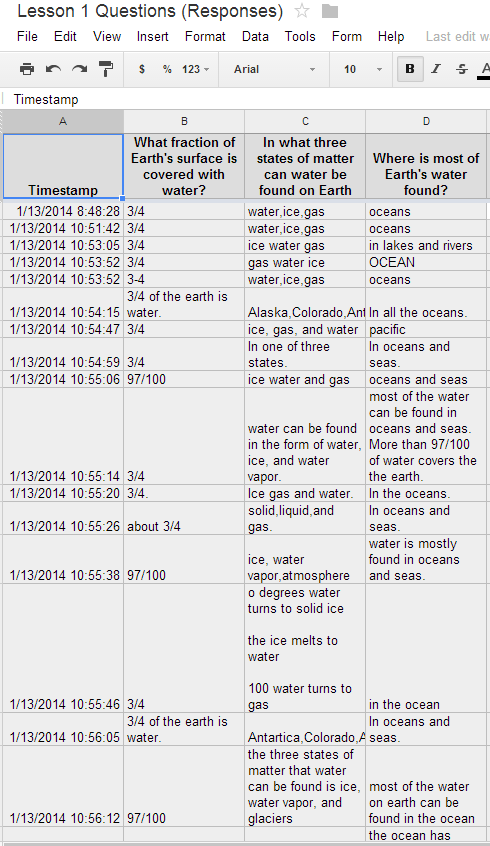
As part of my formal observation I wanted to have a assessment at the end of the lesson that my kids could access online to tell me what they learned, what concepts they have finished, and what lessons they are still working on.  I saw this lesson from Meg at Fourth Grade Studio a couple of weeks ago where Meg used Google forms as an assessment tool and thought to myself, "That is a brilliant idea, why didn't I think of that?" 
I had to figure out a way to share my Google form with my kiddos though because they don't have gmail accounts.  This is where last week's tutorial comes into play.  I created my form and set it to be shared.  I took the URL code and copied it into a new GoogleDoc.  Then I made the GoogleDoc sharable to anyone with a link.  I shared the link with my students through Todays Meet - which I love and you can read more about {here}.  My students will be using the math Google Form today in class.  I wanted to test out this method on Monday before my big formal observation.
  I created 4 separate forms that went along with our science text book and put all the links on one GoogleDoc that I can update as necessary and shared that Doc with the class through TodaysMeet. 
This is the shared Google Doc with the form links
This is what the students see when they click on the link.
I love that I can assess my students so easily and quickly. Seriously took me less than 5 minutes to grade all of their responses because the answers populate a new spreadsheet.  So amazing and an easy way to keep track of data!

I'm linking up with Holly from Fourth Grade Flipper today for Tried It Tuesday.  Make sure you go check out what everyone else has been trying!


I'm also adding my link to Techie Tuesday Link Up over at Technology Tailgate!


Tuesday, January 7, 2014

Tried It Tuesday: Sharing Google Docs

I would just like to say that I am all about trying new things!  I love being able to do or try something I've never done before.  That's why I love linking up with Holly at Fourth Grade Flipper for Tried It Tuesday!

Today I'm going to give you a quick tutorial on sharing documents using Google Docs.  I have downloaded items from so many other fabulous teachers and bloggers through Google Docs, but I have never uploaded a product to share before.  I thought I would try it yesterday for my Monday Made It post and it really was super easy!  


Here's what to do!


Simple as that!  
I really want to use this with my students to share files/forms/quizzes with them since they don't have Gmail accounts.  I hope everyone enjoyed the banner document I shared!

Tuesday, December 10, 2013

Tried It Tuesday

Ok, so I have to start off this post with a funny.  So with all of the snow we've had here, my hubby has gone on a cleaning/organizing binge!  As I was taking pictures of all of my crafts from our snow days, he come out of the office (in desperate need of organizing) and says, "I should have taken before and after pictures of the office for my Tuesday Made It!"  Ha Ha!  We had to over the linky days after that!  Too funny.  At least he listens a little bit!

Now on today's Tried It Tuesday link up with Holly over at Fourth Grade Flipper!


I have two "tried its" to share with you today! One is from home and the other is from school!

First, my home "tried it"
Freezer Paper Stencils!

My tried it with my stockings is using freezer paper as a stencil for painting.  I wrote about my new stockings that I was making in my Monday Made It post.  Yesterday, they weren't finished, because I was having issues with my Cricut.  I changed computers and viola! It worked!  I use Cricut Craft Room to design my monograms and fit 4 nutcrackers on one page.  


Then I cut the freezer paper with the Cricut.  I cut the freezer paper with an exacto knife and then ironed on each piece to my 3 stockings.  I will say that the paper had a much harder time sticking to the burlap than the plain black fabric. 


I bought white glittery fabric paint to use for this part of the project.  As I was painting the stockings, I realized that the fabric paint was actually white, but just glittery!  It looked good on the black fabric, but I was worried about it showing up on the burlap.  So I went back over the monograms with white acrylic paint and that was a good choice!  


We went out to run some errands and when we came back the paint had dried and I pulled the stencils off the stockings and this what I was left with!  The nutcrackers are kind of transparent, but when the light catches the glitter, they are so pretty!


I am absolutely in love with them!  I can't remember the last time I put this much effort into a project! I need to find a new project to use with freezer paper!  I wonder if you can use it on canvas???


Next, my school "tried it"
Genius Hour

With my 21st Century Classroom grant,  I attended a week long training last summer.  You can read more about that {here}.  One of the things we talked about was Genius Hour.  If you'd like to learn more about Genius Hour you can go {here}.  Basically Genius Hour is a time for students to research and explore topics that they are interested in.  They get to pick what they research and how they present their new information.  I introduced this idea to my students and they were so excited!  We had quite the discussion about appropriate and inappropriate topics.  I told them that if it wasn't going to help them learn and become more educated, then it wasn't a good topic.  

I did have some challenges with this first time of Genius Hour.  The kids asked if they would work in groups and I told them yes, if everyone wanted to research and learn about the same thing.  I had some students who wanted to work together but couldn't agree about what to learn about.  I had to explain that just because you are friends doesn't mean that working together is a good idea.  I also had some students who couldn't figure out what they wanted to learn about!  At the same time, I had some students who were already working on a power point while they were researching.  We used Penzu and word to take notes while we were researching.  Here are all of my little researchers!


At the end of the class, I wanted my students to be accountable for the work they did in class, so I had them respond to two questions in TodaysMeet - What topic are you researching? What did you learn about your topic today?  These are some of their responses.  


What new things have you tried this week?  Don't forget to go check out all of the other awesome "tried its"!
Related Posts Plugin for WordPress, Blogger...