Image Map
Showing posts with label technology. Show all posts

Friday, April 11, 2014

Five for Friday

WOW!!!!  It has been such a LONG week, but isn't testing week always super long?  I'm so glad it's Friday and that I am headed towards a relaxing weekend.  It's been awhile since I've had my act together together to link up with Doodle Bugs Teaching for Five for Friday but today is that day!!!!


TESTING IS OVER!!!!!  
Last year's test released items!  I have no idea of course what was on this year's test
We have 4 days of testing here in Arkansas over reading, writing, and math. My kiddos finished testing yesterday and boy does it feel good!  I ripped down all the chart paper covering my classroom as soon as we finished the test. My feet and back are tired from all the walking, too!

I've been working hard on my reading over the past few weeks.  I've read two more of the Charlie May Simon books and now I'm reading Junonia by Kevin Henkes. 
After I finish this book, I'll only have 3 left!  They've already put out next year's list, so maybe I'll get started earlier! 
 My kids have started giving me books to read now, which I love!


I wrote about completing the Hour of Code with my students here back in December.  Well since we didn't really have much of an afternoon any day this week, I decided that we would code with our extra time.  My kids LOVE it and it's so good for their problem solving skills!  I also got back into code, because the kids were getting ahead of me and I couldn't have that! 


Tuesday, was my hubby's birthday!  He's 6 months older than me and I love to rub it in his face!!! He's OLD!!!! And by old I mean 27!!! LOL!  We had a chill night of Chicago Style pizza and a movie at home.  


My sweet little girl had her 15 month check up yesterday.  I can't believe how big she is getting or how long her hair is getting!  She's in the 9th percentile.  Dr. says she's in perfect health and was impressed by how many words she knows, that she uses sign language, and that she can walk on her tip toes!  I love being her mommy!

Tuesday, April 1, 2014

Tried it Tuesday: Graphite Field Notes

WOAH!!!!  Can you believe it?! 3 posts in 3 days!!!!  I was very busy on Sunday! Ha! Oh and Happy April Fools Day!

I love Tuesdays because I love getting to see what all my blogging buddies out there in blogland are trying over at Holly's Tried It Tuesday Linky Party!
Have you ever gone looking for an app or website with a specific content, purpose, or task in mind only to be overloaded with all of the options out there?  I can tell you that this has happened to me many times and I often just choose the app/site that pops up first.  I can also tell you that just because it's listed first, doesn't mean it's the best product for whatever is I'm needing.  I like being able to look at reviews.  It's how I decide on most of my purchases, like my new iPad mini, by reading the reviews.
Well to solve the problem of the app/site overload, I would like to introduce you to Graphite by Common Sense Media!
This site has TONS of reviews of apps/sites by real teachers!  What's even better is that you can review apps/sites by creating "Field Notes" on a review.  These field notes tell other teachers exactly what you think of the app/site.  You can say what you like or don't like, how you use it in your classroom, and what your students are able to learn by using this app/site.  So really this "Tried It" is writing Field Notes for Graphite! There was also a little incentive I came across that if you wrote 2 field notes before March 31, they would send you a thank you gift in the way of a $25 Amazon gift card!  Who can't use free money for telling what you think about apps that you use in your classroom! I'll let you know if/when my free money arrives!  I'm so excited to explore this site more and have my 4th graders complete their digital citizen passport!

I found this little gem from Jenny at Sun Tans and Lesson Plans!  I was so inspired by her that now I'm working on becoming a Certified Education in Digital Citizenship!  Thanks Jenny!

Make sure you head over to Fourth Grade Flipper to see what everyone else is trying!

Saturday, March 15, 2014

Spark Student Motivation: Scholastic News

So I've been a terrible blogger!!!!  I love to blog truly.  I love getting to share what is going on in my classroom and how my students are becoming amazing problem solvers, but the TIME!!!!  There is just not enough of it!!!!  I've been working on a "Tried It Tuesday" post for 3 weeks now and just can't seem to get it published.  I really need to work on spending time getting posts ready and scheduling them to post.
I decided to take one of my "Tried It's" and turn it into a Spark Student Motivation Saturday Post.  I've never linked up with Joanne over at Head Over Heels for Teaching for her weekly linky, but I love reading about what everyone is doing to keep students engaged and motivated to learn.
We got a subscription to Scholastic News this year through our fabulous PTO.  We didn't actually start getting the magazines until January but we wanted to make the best use of the half year we will get them.  My kids love getting to read Scholastic News!  There are so many interesting articles and it's a great spark for independent research and such.  Well, since I have my class set of laptops, I decided to explore the online version of Scholastic News.

I played around with it a little one morning and decided to give my kiddos a chance to explore and see what they thought. Here is the screen when the students log in.


This was the result!!!  Yes, the volume is turned up!


My kids were totally silent for the 15 minutes I gave them to "play" on Scholastic News. There are so many features to love about the online version of Scholastic News.  There is a read aloud function, which is wonderful for my SPED and ELL students who have difficulty reading grade level texts.  There are videos to go along with the articles and the students can take the "quizzes" on the back page electronically as well.  I gave our class code to my parents as well, so they can access the magazines from home.
My students now ask if they can get on Scholastic News any time they have a little free time!  That's what I call student motivation!

Wednesday, February 19, 2014

Tried It Tuesday: PicMonkey

Sorry I've been MIA for the past week.  I was really enjoying my February break at home with my sweet little girl.  Check out my sweet Valentine!!!
I'm super excited to link up with my BBB Holly for her weekly linky party Tried It Tuesday. I know that it's Wednesday, but I actually did try this yesterday, but just didn't get to blog about it!

This is a linky party where you write about anything that you have "tried".  It can be from school, home, family, food... really anything!  I love seeing what new things all of my blogger friends have tried!

So this post is really a spin off of Amy's of the Babbling Box's post from last week's linky party.  She wrote about using PicMonkey.com to have her kiddos create pictures with quotes and then blog about it.  Holy Cow!!!!  Why didn't I think of that? I love using PicMonky personally.  It's actually how I put my blog address on my pictures that I post here on my blog, but I never thought of using it with my kids! After reading Amy's post last week, I knew that I needed to figure out a way to use this in my classroom!

Enter yesterday...We have been working on our government lapbooks for the better part of a month between snow days, extended math lessons, and February break.

We finally finished them on Monday and I knew that I wanted my kids to blog about their learning on Tuesday.  As they were getting their laptops out, I remembered Amy's post and shifted gears right then!  I modeled everything we did as the kids did it, which is always a little challenging, but definitely helpful.  We used Google Junior to find an image that represented the government (they have added images to the safe search, YAY!).  Then we went to Brainy Quote and found a quote about the government that went with the picture we chose.  Then enter Pic Monkey.  I showed them how to upload the picture and then add text and then I let them go to town playing with the effects.  They had a blast and made some very cool pictures!

Here are a few of the edited pictures
I love how he changed the font color so you could see the words depending on where they are on the picture.
Next we had to learn how to upload a picture to our blogs, which we had never done before.  Again another challenge, especially when my picture wouldn't upload (oh technology)! Then they had to write about what they learned in their study of the government.  They finished their blogs today and then they had to comment on two other blog posts.


One other cool thing about this lesson, was that one of our district technology specialists was in the building and peeked in to see what we were doing and was pretty impressed with our blogging and such!  I love being able to show off how I'm using my grant in my class!

Tuesday, January 14, 2014

Tried It Tuesday: Google Forms

So last week, I wrote about creating Google docs that are sharable.  This week I am taking what I tried/learned last week and ramping it up a notch!
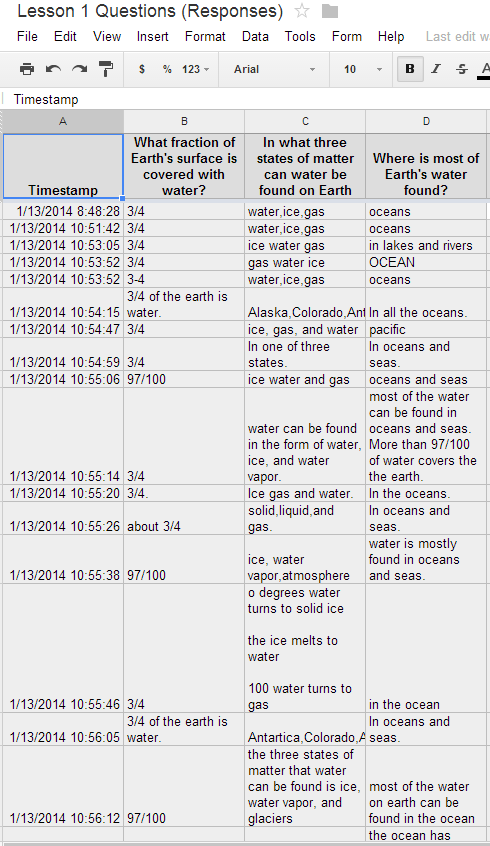
As part of my formal observation I wanted to have a assessment at the end of the lesson that my kids could access online to tell me what they learned, what concepts they have finished, and what lessons they are still working on.  I saw this lesson from Meg at Fourth Grade Studio a couple of weeks ago where Meg used Google forms as an assessment tool and thought to myself, "That is a brilliant idea, why didn't I think of that?" 
I had to figure out a way to share my Google form with my kiddos though because they don't have gmail accounts.  This is where last week's tutorial comes into play.  I created my form and set it to be shared.  I took the URL code and copied it into a new GoogleDoc.  Then I made the GoogleDoc sharable to anyone with a link.  I shared the link with my students through Todays Meet - which I love and you can read more about {here}.  My students will be using the math Google Form today in class.  I wanted to test out this method on Monday before my big formal observation.
  I created 4 separate forms that went along with our science text book and put all the links on one GoogleDoc that I can update as necessary and shared that Doc with the class through TodaysMeet. 
This is the shared Google Doc with the form links
This is what the students see when they click on the link.
I love that I can assess my students so easily and quickly. Seriously took me less than 5 minutes to grade all of their responses because the answers populate a new spreadsheet.  So amazing and an easy way to keep track of data!

I'm linking up with Holly from Fourth Grade Flipper today for Tried It Tuesday.  Make sure you go check out what everyone else has been trying!


I'm also adding my link to Techie Tuesday Link Up over at Technology Tailgate!


Tuesday, January 7, 2014

Tried It Tuesday: Sharing Google Docs

I would just like to say that I am all about trying new things!  I love being able to do or try something I've never done before.  That's why I love linking up with Holly at Fourth Grade Flipper for Tried It Tuesday!

Today I'm going to give you a quick tutorial on sharing documents using Google Docs.  I have downloaded items from so many other fabulous teachers and bloggers through Google Docs, but I have never uploaded a product to share before.  I thought I would try it yesterday for my Monday Made It post and it really was super easy!  


Here's what to do!


Simple as that!  
I really want to use this with my students to share files/forms/quizzes with them since they don't have Gmail accounts.  I hope everyone enjoyed the banner document I shared!

Friday, December 13, 2013

Five For Friday

I have been so happy to be in school for the last two days!  I can't believe I'm saying that this close to Christmas, but after being home for a week, I was so ready to be back in the classroom!  I've actually blogged EVERY DAY this week!  I can't even believe it! It's Friday and so I'm linking up with Doodle Bugs Teaching for Five for Friday to tell you about 5 random facts from my snowy/icy week!


 I was out of school for 5, yes, you read that right, 5 snow days! We started last Thursday and we were out until Wednesday!  We had about two inches of sleet and then nine inches of snow on top.  The problem with Arkansas is that we have no infrastructure to take care of the roads when weather gets bad because we don't have a lot of bad weather.  Our roads for the past week have just been sheets of ice and it would be really dangerous for busses to run!  Here is an example of one of the "main" roads. 


Because of all the days at home, I did a TON of crafting!  You can check out my some of crafting projects {here} on my Monday Made It  and Tried It Tuesday posts.  Here are a couple of other items I made during my snow days


I did a little Christmas photo shoot with my little one while were stuck at home for our Christmas cards.  I tried the naked baby with lights idea and this is what happened.


We tried again later, and this is how our Christmas cards came out.  I really love them!


I wrote about our experience with Hour of Code {here}


I'm no longer a "No Reply" blogger!

I had no idea that this was happening until Allison from Rockin' and Lovin' Learning pointed out the error of my ways!  If you aren't getting email replies to comments you leave on your BBB posts, then check out this post  or this post to guide you to fixing the problem! 

I'm now off to check out what everyone else has been up to this week!
Related Posts Plugin for WordPress, Blogger...